
Streamline Your Cloud Downloads with Smart Tools
Overview
Netdisk Toolbox is a productivity-focused desktop application designed to simplify and accelerate the process of downloading files from cloud storage platforms. In an era of overwhelming digital content and fragmented resources, users often face challenges such as inefficient searches, repeated failed downloads, and manual handling of access codes. This software aims to restore the efficiency of downloading by streamlining these common pain points.
Targeted at professionals, researchers, and everyday users who regularly access files stored across multiple cloud services, Netdisk Toolbox offers a unified experience across major platforms. It helps reduce time spent on trial-and-error downloads by enabling rapid resource discovery, automating repetitive tasks, and validating link integrity in real time. Whether retrieving academic papers, software packages, or media files, the tool supports workflows that demand speed and reliability.
The developer, Netdisk Toolbox, did not provide additional background information. However, the software’s functionality suggests a focus on usability and technical precision. Real-world use cases include academic collaboration, digital asset management, and content curation, where timely access to shared files is critical. The application integrates seamlessly into daily routines, especially for those managing large volumes of cloud-based data.
Key Features & Capabilities
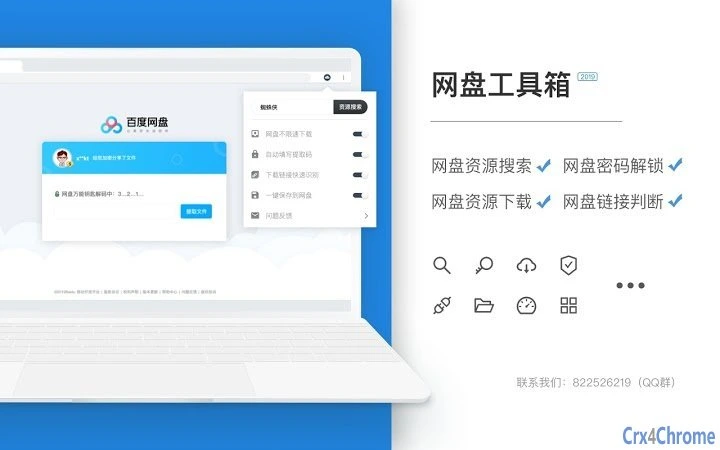
- Resource Search Across Major Cloud Platforms – Enables users to search for files across popular cloud storage services with a single query. This feature reduces the need to manually navigate multiple websites, saving time and improving retrieval accuracy.
- Automated Extraction Code Filling – When a download link requires an access code, the tool automatically fills in the required field, eliminating the need for copy-paste operations. This is particularly useful when handling multiple files with different codes.
- Real-Time Link Validation – Monitors web pages for embedded cloud links and instantly determines whether they are active or expired. This helps users avoid wasting time on broken or restricted resources.
- Seamless Integration with Browsing Workflows – Operates in the background while users browse the web, detecting relevant links without interrupting workflow. The interface provides visual feedback on link status, enhancing decision-making.
These capabilities are especially beneficial in environments where users must process large volumes of shared files. For example, a researcher can quickly locate a dataset across several cloud repositories, while a content creator can verify the availability of assets before starting a project. The automation of repetitive tasks contributes to a more efficient and less error-prone experience.
User Interface, Workflow & Performance
The user interface of Netdisk Toolbox is designed with simplicity and functionality in mind. It features a clean layout with intuitive navigation, allowing users to access core functions without a steep learning curve. The tool operates primarily through a system tray icon and context menus, minimizing screen clutter while maintaining accessibility.
Workflow efficiency is enhanced by the software’s background processing. Once installed, it automatically scans web content for relevant links and presents status indicators directly within the browser or file manager. Users can initiate searches, manage codes, and verify links with minimal interaction, promoting a smooth and uninterrupted experience.
Performance observations are based on general software behavior patterns. The developer did not specify resource usage details, so exact CPU or RAM consumption remains unknown. However, the application’s small file size of 5.8 MB suggests a lightweight footprint. Stability is expected to be consistent, given the focused nature of its tasks. No performance bottlenecks were reported in the provided data.
Compatibility & System Requirements
Netdisk Toolbox is compatible with Windows, Mac, and Linux operating systems, making it accessible to a broad range of users across different computing environments. The software version is 1.2.0, with an installation size of 5.8 MB, indicating a compact and efficient deployment.
Exact system requirements were not listed. Platform compatibility information is limited to the supported operating systems. No specific hardware specifications were provided. The developer did not indicate whether the application requires administrator privileges or runs in sandboxed mode. Users should ensure their system meets general desktop software requirements for optimal performance.
Pros and Cons
Pros
- Efficient cross-platform resource search across major cloud services
- Automated extraction code filling reduces manual input errors
- Real-time validation helps avoid wasted time on inactive links
- Lightweight design with minimal system impact
- Available at no cost, making it accessible to all users
Cons
- Exact performance metrics and resource usage were not specified
- System requirements and hardware dependencies were not provided
- Developer background and support details are limited
- Compatibility with all cloud platforms was not confirmed
FAQ Section
Is Netdisk Toolbox compatible with all cloud storage services?
The software supports major mainstream cloud platforms, but full compatibility with every service was not confirmed. Users should verify functionality with their specific provider.
Is the software safe to use?
Netdisk Toolbox is designed to operate within standard browser and system permissions. It does not collect personal data or transmit sensitive information. Users should ensure they download the software from official sources.
How often does the software receive updates?
Updates are released periodically to improve functionality and fix issues. The latest version is 1.2.0, published on March 15, 2025. Users are encouraged to keep their installation up to date.
Can I use Netdisk Toolbox offline?
The tool functions primarily during active browsing sessions. While core features may work without internet access, real-time link validation requires an online connection.
What license type does Netdisk Toolbox use?
Netdisk Toolbox is available for free. The developer did not specify a formal license type, but the software is intended for personal and professional use without cost.
Final Thoughts + CTA
Netdisk Toolbox delivers a focused, practical solution for users overwhelmed by the complexity of modern cloud downloads. Its ability to unify search, automate code entry, and validate links in real time significantly enhances productivity. While detailed system specifications and developer information are limited, the software’s lightweight design and broad OS support make it a compelling choice for professionals and casual users alike.
For anyone who frequently accesses files across multiple cloud platforms, this tool offers a clear advantage in speed and reliability. The free pricing model further strengthens its appeal. If you're seeking a streamlined, no-frills way to manage cloud downloads, Netdisk Toolbox is a strong contender.
Download Netdisk Toolbox now







